
AUTOREDLINE BLOG / FAI WALKTHROUGH
PDF to inspection Excel: a worked FAI preparation example
Follow a drawing requirement from the source PDF to a numbered balloon and an editable inspection worksheet. This worked example shows the generated files and the checks to make before using them.
1. Open the drawing and saved outputs
AutoRedline takes one mechanical drawing PDF and generates proposed inspection balloons with a matching Excel worksheet. Review the requirements and their locations, correct them as needed, then export the ballooned PDF and workbook. This article walks through the saved output so you can inspect that handoff yourself.
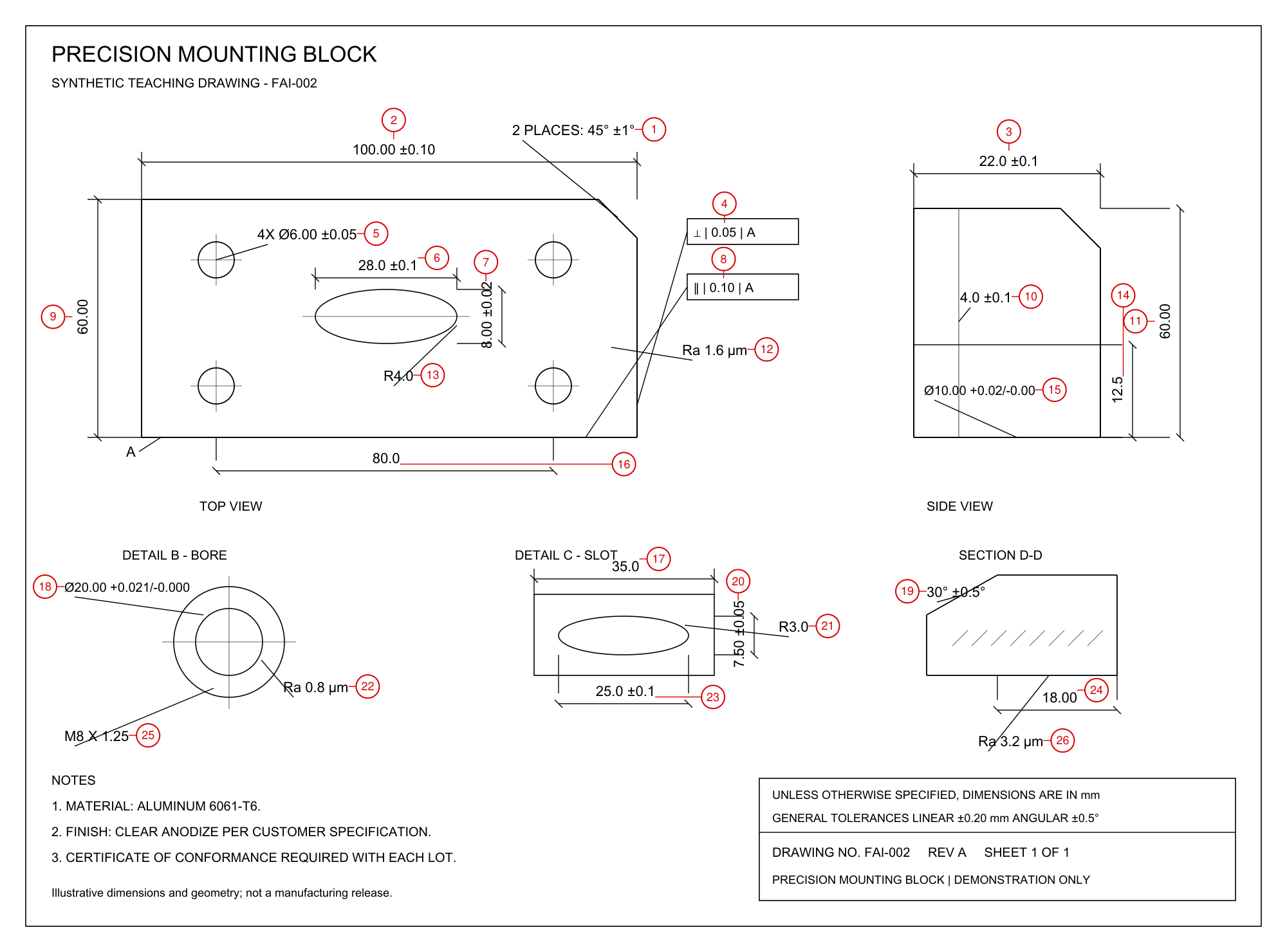
The example is FAI-002 Revision A, a synthetic precision mounting block. AutoRedline processed this teaching drawing to produce the files below. It is not a customer inspection, a manufacturing release or an accuracy benchmark. The linked outputs precede edits in the public browser demo.
Open the PDF and workbook together. In Excel, select the Dimensional inspection sheet. Its heading is on row 10 and its first result row is 11. There are 26 generated balloons and 30 feature-result rows. The difference comes from repeated features.
2. Trace a dimension into its Excel row
Find 100.00 ±0.10 at the top of the drawing. The generated marker is balloon 2. In the saved workbook, row 13 carries balloon 2, sheet 1 and instance 1. The requirement text is in column E, nominal in F, lower and upper limits in G and H, and units in I.
The nominal is 100 mm and the explicit limits are 99.90 to 100.10 mm. Column J, Measured result, is blank. A generated requirement does not tell us whether a manufactured part meets it.
| Balloon | Source requirement | Qty | Excel row(s) | Lower / upper | Unit |
|---|---|---|---|---|---|
| 1 | 2 PLACES: 45° ±1° | 2 | 11–12 | 44 / 46 | ° |
| 2 | 100.00 ±0.10 | 1 | 13 | 99.90 / 100.10 | mm |
| 4 | ⊥ | 0.05 | A | 1 | 15 | 0 / 0.05 | mm |
| 5 | 4X Ø6.00 ±0.05 | 4 | 16–19 | 5.95 / 6.05 | mm |
| 9 | 60.00 | 1 | 23 | 59.80 / 60.20 | mm |
| 12 | Ra 1.6 µm | 1 | 26 | — / 1.6 | µm |
The table reproduces selected saved records, not a second inspection report. A numeric limit beside a geometric control must be read with its complete requirement text and datum reference.
3. Check repeated features and tolerance sources
Balloon 5 identifies 4X Ø6.00 ±0.05. It represents one callout applying to four holes. Excel rows 16–19 repeat balloon 5 with instances 1–4, each with a 5.95 to 6.05 mm diameter requirement. Preserve all four result rows when recording measurements. Four rows here are intentional, rather than four different balloon numbers.
Balloon 1 similarly identifies two places at 45° ±1°. Its two result rows are 11–12, with limits of 44° and 46°. Together, these quantity expansions explain why 26 balloons become 30 result rows.
For balloon 9, the source shows 60.00 without a local tolerance. The drawing's title block declares a general linear tolerance of ±0.20 mm. The saved worksheet therefore lists 59.80 and 60.20 mm on row 23. Verify the title block before applying this reasoning to another drawing; those limits are specific to this example.
4. Keep geometric controls and surface requirements intact
Balloon 4 points to ⊥ | 0.05 | A. Row 15 preserves that full specification. The upper-limit value 0.05 alone does not express the perpendicularity requirement or its reference to datum A. Check the source control frame and retain the full text when choosing an inspection method.
Balloon 12 identifies Ra 1.6 µm. Its row 26 has an upper limit of 1.6 µm, with nominal and lower limit blank. Treat it as the surface-roughness requirement shown on this drawing. Do not convert it into a nominal dimension with a symmetric ± tolerance.
These examples demonstrate what to inspect in the exported records. They do not establish that every requirement on a new drawing will be extracted correctly.
5. Review the separate manufacturing checks
Open the workbook's Manufacturing checks sheet. Rows 11–13 contain the material note for aluminum 6061-T6, the clear-anodize requirement and the certificate-of-conformance requirement. These are separate checks with blank result or certificate-reference fields. Counting the drawing balloons alone would overlook this part of the saved workbook.
Read each note against the source and determine the evidence your process requires. On your own jobs, select the applicable document, coating, paint and packaging options before generation. Complete the report's drawing number, revision, lot or serial, inspector and date fields as appropriate; the saved example leaves those report fields blank.
6. Correct the records, then check both exports
In the public interactive example, explore moving and renumbering balloons and changing quantities, then download the edited files. The saved links above remain the original output. The signed-in workspace provides the full characteristic review and correction workflow.
- Compare the extracted list with the source. Record missing, duplicated or misinterpreted requirements before changing anything.
- Correct requirements and quantities, move unclear balloons, and add or remove characteristics as needed in the workspace.
- Export the ballooned PDF and Excel from the same reviewed result. Open them separately and check number-to-row identity, repeated instances, full requirement text and legibility.
- Retain the original drawing and identify its revision with the reviewed files. Measure the article, enter actual results and collect supporting records through your quality process.
AutoRedline prepares a ballooned drawing and inspection worksheet. It does not produce a complete AS9102 Forms 1–3 FAIR or approve an inspected part. For aerospace FAI, refer to the IAQG 9102 resources and your customer's requirements.
Standards checking is planned and is not available in AutoRedline today. We plan to support drawing reviews against selected standards and company rules. No release date is announced.
Prepare an inspection worksheet from your drawing, or read the FAI software selection and evaluation guide. For revision review, follow the ECO redline recipe.